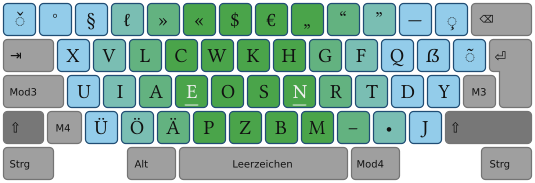
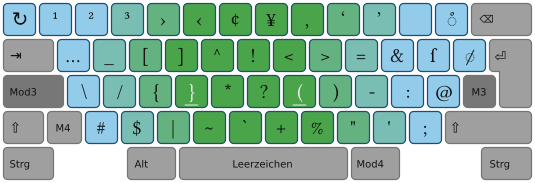
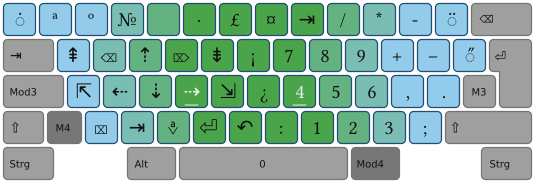
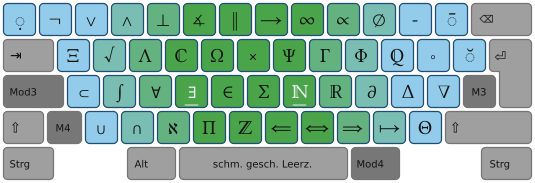
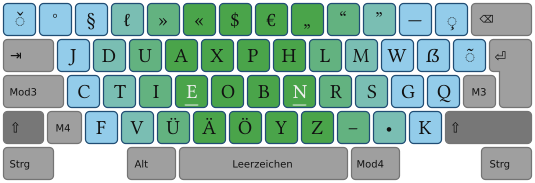
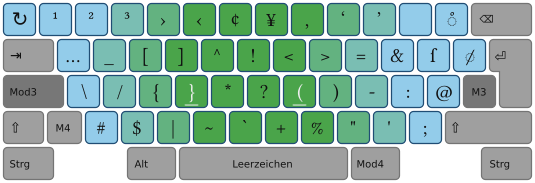
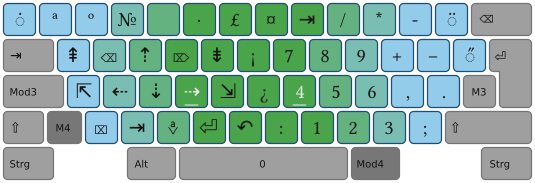
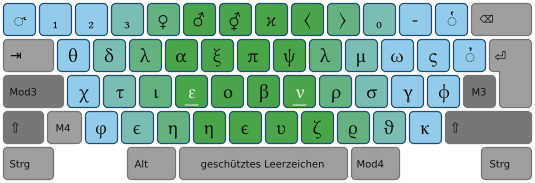
root/www/index.html @ 1285

Revision 1285, 25.3 KB (checked in by martinEngel, 4 years ago)

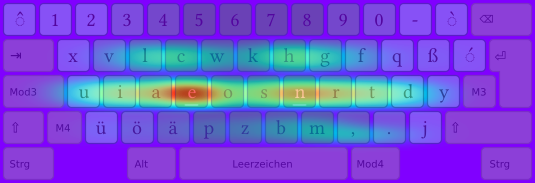
tastentierchen mit Betriebssystemtags versehen

Line 
1<!-- <!DOCTYPE HTML PUBLIC "-//W3C//DTD HTML 4.01//EN" "http://www.w3.org/TR/html4/strict.dtd"> /-->
2<html>
3<head>
4<title>Neo – Ergonomisches Tastaturlayout</title>
5<meta http-equiv="content-type" content="text/html; charset=UTF-8">
6 <link rel="shortcut icon" href="./favicon.ico">
7<!-- <link rel="stylesheet" type="text/css" href="stylesheet.css"> /-->
8
9<script type="text/javascript">
10function Tastaturbildwechsel_nach (Zielebene) {
11        self.document.tastaturbild.src="./tastaturbilder/ebene" + Zielebene +".png";
12        for (var Nr = 1; Nr <= 6; Nr++) self.document.getElementById("ebenenreiter" + Nr).style.color="";
13        for (var Nr = 1; Nr <= 6; Nr++) self.document.getElementById("ebenenreiter" + Nr).style.borderColor="";
14        self.document.getElementById("ebenenreiter" + Zielebene).style.borderColor="#56b";
15        self.document.getElementById("ebenenreiter" + Zielebene).style.Color="#23b";
16        return false;
17  }
18</script>
19
20
21
22<style type="text/css">
23
24#Hauptfeld {
25  width:39em;
26  border-width:thin;
27  border-color:#444;
28  border-style:solid;
29  margin-left:12em;
30  margin-right:0em;
31  margin-top:2em;
32  padding-left:2.5em;
33  padding-right:4em;
34  padding-top:2em;
35  padding-bottom:2.4em;
36/* text-align:justify;  */
37/* font-family: Trebuchet MS, Tahoma, Verdana, Arial, Helvetica, sans-serif; */
38/*  font-family: LinuxLibertine, Libertine, Linux-Libertine, sans;
39  line-height:1.35em;
40  font-size:1em;*/
41  background-color:White;
42  color:Black;
43}
44
45#Hauptfeldlink_rechtsunten {
46  position:relative; top:.8em; left:.5em;
47  text-align:right;
48  margin-bottom:0em;
49}
50
51#Navigationsleiste {
52  background-color:#F8F8FA;
53  color:WindowText;
54  position:relative; 
55  width:10em; 
56/* float:left;  */
57  text-align:center; 
58  margin:2em;
59  margin-left:0em;
60  margin-top:2em;
61  border-width:thin; 
62  border-style:solid; 
63  border-color:green; 
64  border-top-width:0px;
65
66}
67
68#Navigationsthema {
69  border-bottom-width:1px;
70  border-bottom-style:solid;
71  border-color:black;
72  border-top-width:1px;
73  border-top-style:solid;
74  border-color:black;
75  text-align:center;
76  font-weight:bold;
77  background-color:#FAFBF8;
78  color:InfoText;
79  padding-top:.2em;
80  padding-bottom:.2em;
81}
82
83#Navigationsunterpunkte {
84  padding-top:.5em;
85  padding-bottom:.75em;
86}
87
88#Navigationseintrag {
89  display:block;
90  text-align:left;
91  padding-left:1em;
92  padding-right:1em;
93  padding-top:.25em;
94  padding-bottom:.25em;
95}
96
97#Bildcontainer_links {
98  width:10em;
99  border-width:thin;
100  border-color:#DDD;
101  border-style:solid;
102  margin-right: 1.2em;
103  margin-bottom: .8em;
104  margin-left: 0em;
105  margin-top: 1em;
106  float:left;
107  text-align:center;
108
109}
110
111
112#Bildcontainer_oben {
113  width:39em;
114  border-width:thin;
115  border-color:#DDD;
116  border-style:solid;
117  margin-left: 0em;
118  margin-bottom: 1.75em;
119  margin-right: 0em;
120  margin-top: 0em;
121/*  float:left; */
122  display:block; 
123  text-align:center;
124}
125
126
127#Bildcontainer_rechts {
128  width:10em;
129  border-width:thin;
130  border-color:#DDD;
131  border-style:solid;
132  margin-left: 1.2em;
133  margin-bottom: .8em;
134  margin-right: 0em;
135  margin-top: 1em;
136  float:right;
137  text-align:center;
138
139}
140
141#Bild {
142  text-align:center;
143  padding:.5em;
144  width:9em;
145}
146
147
148#Bild_oben {
149  text-align:center;
150  padding:.5em;
151  width:38em;
152}
153
154
155
156#Bildtext {
157  padding:.5em;
158  font-size:small;
159  text-align:left;
160  background-color:#EEE; 
161}
162
163#Hintergrundverlauf_von { 
164  background-color:#F30;
165}
166
167#Hintergrundverlauf_nach { 
168  background-color:transparent;
169}
170
171a         {  text-decoration:none;  }
172a:hover   {  color:HighlightText; background-color:Highlight; }
173
174h1        {  margin-bottom:1em; margin-top:0em;   font-size:1.5em; }
175h2        {  margin-bottom:.5em; margin-top:1.5em;  font-size:1.2em; /* padding-left:1em; */ }
176
177p         {  /* text-indent:1em; 
178                text-align:justify; */
179               margin-bottom:-.5em;}
180
181/* Altbestand: */
182
183#linkbutton
184        {
185        line-height:2em;
186        text-align:left; color:#000;
187        }
188
189#linkbutton a
190        {
191        border-width:2px; border-style:solid;
192        border-color:#aaaaaa;
193        padding-top:.25em; padding-bottom:.25em;
194        background-color:#FAFAFA;
195        padding-left:1em; padding-right:1em;
196        }
197
198#linkbutton a:link    {  color:#000; text-decoration:none;      }
199#linkbutton a:visited {  color:#4a4a4a; text-decoration:none;   }
200#linkbutton a:focus   {  color:#223; text-decoration:underline; }
201#linkbutton a:active  {  color:#8b2121; text-decoration:none;  }
202#linkbutton a:hover   {  color:#020; text-decoration:none;
203                         background-color:Highlight;         
204                      }
205
206#Gesamtzentrierung { 
207        background-color: transparent; 
208        text-align: left; 
209        margin: 0px auto 0; 
210        width: 57.5em; 
211}
212/*-------------*/
213
214</style>
215
216<!--[if lte IE 7]>
217    <style type="text/css">
218
219#Bild_oben {
220  width:31em;
221}
222
223#Bildcontainer_oben {
224  width:32em;
225}       
226#IE6-Bildweitenkorrektur {
227  width:32em;
228}
229
230
231    </style>
232<![endif]-->
233
234
235</head>
236<!-- Für Mittenpositionierung: padding: 0; margin: 0; text-align: center; ind bodystyle /-->
237<body style="background-color:#dceeee; padding: 0em; margin: 0em; text-align: center; ">
238
239
240<p style="position:absolute; display:block; width:100%; top:0em; left:0px; text-align:center; background-color:#F30; color:#FFF">
241 <b>Achtung: Baustelle! Mehr Informationen unten.</b>
242</p> 
243
244
245
246
247<div id="Gesamtzentrierung"> 
248
249
250
251
252
253<!-- Logo /-->
254<!-- <div style="position:relative; top:2.25em; left:3.25em; width:522px; height:70px;  overflow:hidden; float:left;"> /-->
255<div style="position:relative; top:2.25em; left:3.25em; width:54em; height:70px;  overflow:hidden; "> 
256<!--
257    <object data="./neo_kopf_trac_522x50.svg" type="image/svg+xml" style="width:522px; height:50px; ">
258            <param name="src" value="./neo_kopf_trac_522x50.svg">
259/-->
260            <img src="./neo_kopf_trac_522x50.png"  alt="Neo – Ergonomisches Tastaturlayout">
261<!--
262    </object>
263/-->
264<!-- </div> /-->
265
266<!-- Quicklinks /-->
267
268
269
270<!-- <div style="position:relative; top:-1.65em; left:43em; width:200px; height:40px;"> /-->
271
272   <!-- Achtung: Die Links sind auch jeweils in den SVG-Dateien kodiert! /-->
273
274<!--
275   <object data="./tastentier_linksblickend_quicklink_linux.svg" type="image/svg+xml" style="width:61px; height:37px;  overflow:hidden; ">
276            <param name="src" value="./tastentier_linksblickend_quicklink_linux.svg">
277/-->
278
279                                                <!--Wird per post-commit hook immer aktuell gehalten!-->
280            <a href="neo_de.xmodmap">
281               <img src="./tastentierchen_pingu.png"  title="quickdownload:Neo_Linux" alt="quickdownload:Neo_Linux"  border="0">
282            </a>
283<!--
284    </object>
285/-->
286
287
288<!--
289   <object data="./tastentier_laechelnd_quicklink_windows.svg" type="image/svg+xml" style="width:50px; height:34px;  overflow:hidden; ">
290            <param name="src" value="./tastentier_laechelnd_quicklink_windows.svg">
291/-->
292                                                <!--Wird per post-commit hook immer aktuell gehalten!-->
293            <a href="neo20.exe">
294               <img src="./tastentierchen_fenster.png"  title="quickdownload:Neo_Windows" alt="quickdownload:Neo_Windows"  border="0">
295            </a>
296<!--
297    </object>
298/-->
299
300<!--
301   <object data="./tastentier_apfel.svg" type="image/svg+xml" style="width:50px; height:34px;  overflow:hidden; ">
302            <param name="src" value="./tastentier_grinsend_quicklink_osx.svg">
303/-->
304                                                <!--Wird per post-commit hook immer aktuell gehalten!-->
305            <a href="neo.keylayout">
306               <img src="./tastentier_apfel.png"  title="quickdownload:Neo_OS-X" alt="quickdownload:Neo_OS-X"  border="0">
307            </a>
308<!--
309    </object>
310/-->
311
312
313
314
315
316<!--
317
318  <a href="https://svn.neo-layout.org/windows/neo-vars/out/neo20.exe">
319     <img src="./tastentier_laechelnd.png" width="50px" height="34px" title="quickdownload:Neo_Windows" alt="quickdownload:Neo_Windows" border="0">
320  </a>
321  <a href="./neo_de.xmodmap">
322     <img src="./tastentier_linksblickend.png" width="50px" height="37px" title="quickdownload:Neo für Linux" alt="quickdownload:Neo für Linux" border="0">
323  </a>
324  <a href="http://wiki.neo-layout.org/browser/mac_osx/neo.keylayout?format=raw">
325     <img src="./tastentier_grinsend.png"  width="50px" height="34px" title="quickdownload:Neo für Mac OS-X" alt="quickdownload:Neo für Mac OS-X" border="0">
326  </a>
327/-->
328
329        <!--Wird per post-commit hook immer aktuell gehalten!-->
330  <a href="neo_portable.zip">
331   <!--  <img src="./tastentier_usb.png"  width="46px" height="40px" title="quickdownload:Neo-Portable für USB-Stick" alt="quickdownload:Neo-Portable für USB-Stick" border="0"> /-->
332     <img src="./usb-stick.png"  width="40px" height="34px" title="quickdownload:Neo-Portable für USB-Stick" alt="quickdownload:Neo-Portable für USB-Stick" border="0">
333  </a>
334 </div>
335<!-- /Quicklinks /-->
336
337<!--
338<div style="height:2em; width:1em;">
339</div>
340 /-->
341
342
343<div style="float:left; width:12em;">
344
345<div id="Navigationsleiste" >
346 <div id="Navigationsthema">Wiki</div>
347  <div id="Navigationsunterpunkte">
348   <a id="Navigationseintrag" href="http://wiki.neo-layout.org/wiki">Wiki-Hauptseite</a>
349  </div>
350 <div id="Navigationsthema">Dokumentation</div>
351  <div id="Navigationsunterpunkte">
352   <a id="Navigationseintrag" href="http://wiki.neo-layout.org/wiki/Einführung">Einführung</a>
353   <a id="Navigationseintrag" href="http://wiki.neo-layout.org/wiki/Benutzerhandbuch">Handbuch</a>
354  </div>
355 <div id="Navigationsthema">Installation</div>
356   <a id="Navigationseintrag" href="http://wiki.neo-layout.org/wiki/Neo%20unter%20Windows%20einrichten">Neo unter Windows</a>
357   <a id="Navigationseintrag" href="http://wiki.neo-layout.org/wiki/Neo%20unter%20Linux%20einrichten">Neo unter Linux</a>
358   <a id="Navigationseintrag" href="http://wiki.neo-layout.org/wiki/Neo%20auf%20dem%20Apple%20Macintosh%20einrichten">Neo unter Mac&nbsp;OS&nbsp;X</a>
359   <a id="Navigationseintrag" href="http://wiki.neo-layout.org/wiki/Neo einrichten">Neo auf anderen Systemen einrichten</a>
360 <div id="Navigationsthema">Grafiken</div>
361   <a id="Navigationseintrag" href="http://wiki.neo-layout.org/browser/grafik/neo20-aufsteller.pdf?format=raw">Aufsteller zum Lernen</a>
362   <a id="Navigationseintrag" href="http://wiki.neo-layout.org/browser/grafik/druckvorlage-svg/neo-druckvorlage.pdf?format=raw">Druckvorlage</a>
363 <div id="Navigationsthema">Download</div>
364  <div id="Navigationsunterpunkte">
365<!-- <a id="Navigationseintrag" href="./download.html">Download</a> -->
366   <a id="Navigationseintrag" href="http://wiki.neo-layout.org/browser/windows/">Windows-Treiber</a>
367   <a id="Navigationseintrag" href="http://wiki.neo-layout.org/browser/linux/">Linux-Treiber</a>
368   <a id="Navigationseintrag" href="http://wiki.neo-layout.org/browser/mac_osx/">Mac&nbsp;OS&nbsp;X-Treiber</a>
369   <a id="Navigationseintrag" href="http://wiki.neo-layout.org/wiki/Neo%20für%20unterwegs">Neo für unterwegs (portabel)</a>
370  </div>
371 <div id="Navigationsthema">Sonstiges</div>
372  <div id="Navigationsunterpunkte">
373   <a id="Navigationseintrag" href="./about.html">Impressum</a>
374   <a id="Navigationseintrag" href="http://wiki.neo-layout.org/wiki/Verweise%20auf%20andere%20Projekte">Links</a>
375  </div>
376</div>
377
378<!--
379<div id="Navigationsleiste" style="border-color:#AAA; opacity:.2;">
380 <div id="Navigationsthema" style="color:#AAA; border-color:#AAA;">FOSS-Links</div>
381  <div id="Navigationsunterpunkte" >
382   <a id="Navigationseintrag"
383      style="text-align:center; padding-top:.5em; padding-bottom:.5em; border-bottom-color:#EEE; border-bottom-style:solid;"
384       href="http://linuxlibertine.sf.net"><img src="./signet_linuxlibertine.png" border="0" style=" opacity:.5; width:50%;"><br>Libertine<br>Open Fonts</a>
385   <a id="Navigationseintrag"
386      style="text-align:center; padding-top:.5em; padding-bottom:.5em; border-bottom-color:#EEE; border-bottom-style:solid;"
387        href="http://dejavu.sourceforge.net"><img src="./signet_dejavu.png" border="0"  style=" opacity:.5;  width:50%;" ><br>DejaVu<br>Font</a>
388  </div>
389</div>
390/-->
391
392
393</div>
394
395
396<!--------------------------------------------------/-->
397<div id="Hauptfeld">
398
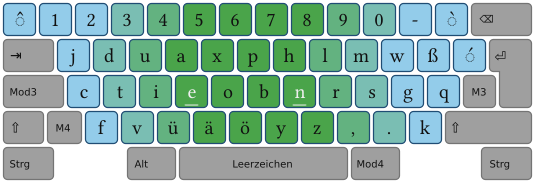
399 <h1>Neo - Ergonomisches Tastaturlayout</h1>
400
401 <p>
402   <font style="color:#222">Neo ist ein neue Tastaturbelegung, die </font>extra für die Deutsche Sprache<font style="color:#222"> optimiert ist:
403   <!--. Ihre Hauptmerkmale sind: /--> </font> 
404 </p>
405
406 <ul>
407   <li><font style="color:#222">Optimierungen bezüglich deutscher</font> Zweier- und Dreier-Zeichenfolgen</li>
408   <li>Programmiertasten <font style="color:#222">sind gut erreichbar</font></li>
409   <li><font style="color:#222">Neue Zeichen, wie </font>&nbsp;„ , ” , « , » , ∫ , √ , α , β , …<font style="color:#222"> sind direkt einzugeben</font></li>
410 </ul>
411
412 <a href="http://wiki.neo-layout.org/wiki/Benutzerhandbuch" id="Hauptfeldlink_rechtsunten">Warum Neo besser ist als qwertz…</a>
413
414</div>
415<!--------------------------------------------------/-->
416
417
418<div id="Hauptfeld">
419<div style="display:block; line-height:2em;" >
420 <div style="text-align:center; ">
421
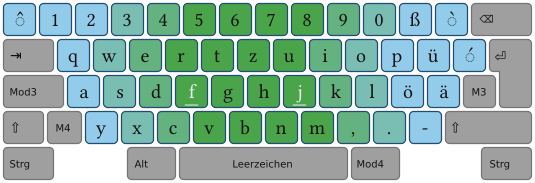
422
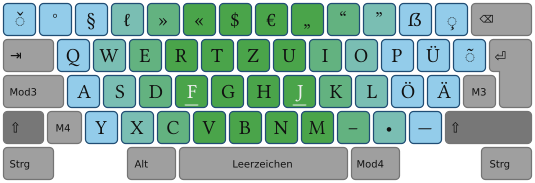
423  <div style="min-width:650px; overflow:visible;">
424    <div id="linkbutton" style="text-align:center; ">
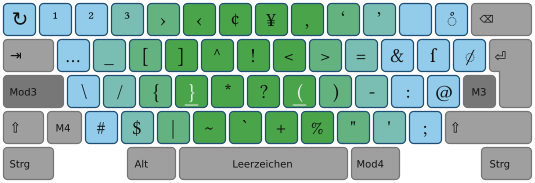
425        <a href="./index_ebene1.html"  style="border-color:#56b; color:#23b" onclick="Tastaturbildwechsel_nach(1); return false;" id="ebenenreiter1" > Ebene1</a>
426        <a href="./index_ebene2.html" onclick="Tastaturbildwechsel_nach(2); return false;"  style="" id="ebenenreiter2">Ebene2</a>
427        <a href="./index_ebene3.html" onclick="Tastaturbildwechsel_nach(3); return false;"  style="" id="ebenenreiter3">Ebene3</a>
428        <a href="./index_ebene4.html" onclick="Tastaturbildwechsel_nach(4); return false;"  style="" id="ebenenreiter4">Ebene4</a>
429        <a href="./index_ebene5.html" onclick="Tastaturbildwechsel_nach(5); return false;"  style="" id="ebenenreiter5">Ebene5</a>
430        <a href="./index_ebene6.html" onclick="Tastaturbildwechsel_nach(6); return false;"  style="" id="ebenenreiter6">Ebene6</a>
431    </div>
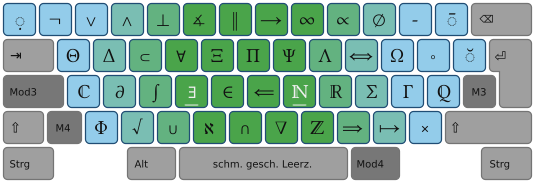
432  </div>
433
434  <div>
435   <img src="./tastatur_ebene1.png"  name="tastaturbild" id="IE6-Bildweitenkorrektur" />
436  </div>
437
438  <div id="linkbutton" style="min-width:650px; overflow:visible; text-align:center;">
439   <a href="i" style="">Konzeptidee zur Ebene1</a> &nbsp; &nbsp;
440   <a href="" > <img src="tastatur_ebene1_shift.png"  style="vertical-align:middle; border-width:0px; margin:2px; background-image:url(./hintergrund_button_hover.png);" /></a>
441
442   <a href="" > <img src="tastatur_ebene1_mod3.png"  style="vertical-align:middle; border-width:0px; margin:2px; background-image:url(./hintergrund_button_hover.png);" /></a>
443   <a href="" > <img src="tastatur_ebene1_mod4.png"  style="vertical-align:middle; border-width:0px; margin:2px; background-image:url(./hintergrund_button_hover.png);" /></a>
444
445   <br />
446
447   <a href="i" style="">Tastenverteilung an beliebigem Text testen (verwendet JavaScript)</a>
448  </div>
449
450
451 </div>
452</div>
453
454</div>
455
456
457<!--------------------------------------------------/-->
458<div id="Hauptfeld">
459
460  <div id="Bildcontainer_oben">
461       <img id="Bild_oben" src="./tastentierchen_baustelle_ohne_zigarette.png" />
462       <div id="Bildtext">Baustelle! Wenn was funktioniert, dann war es Glück!</div>
463  </div>
464
465
466<h1>Kurzinformation für Interessierte</h1>
467
468<p> Um an Neo zu ge&shy;langen, wird auf das SVN-Reposi&shy;tory: <b>svn co https://svn.neo-layout.org neo</b> verwiesen. Hier sind die direk&shy;ten Links zu den NEO-Treibern für die ver&shy;brei&shy;testen Be&shy;triebs&shy;sys&shy;teme (in jedem Ordner be&shy;findet sich eine Datei README.txt mit weiter&shy;gehen&shy;den In&shy;forma&shy;tionen):</p>
469
470<ul>
471  <li>Windows: <a href="http://wiki.neo-layout.org/browser/windows/">http://wiki.neo-layout.org/browser/windows/</a></li>
472  <li>Linux: <a href="http://wiki.neo-layout.org/browser/linux/">http://wiki.neo-layout.org/browser/linux/</a></li>
473  <li>Mac&nbsp;OS&nbsp;X: <a href="http://wiki.neo-layout.org/browser/mac_osx/">http://wiki.neo-layout.org/browser/mac_osx/</a></li>
474</ul>
475
476
477<p>Die <b>aktu&shy;elle Be&shy;legung</b> findet sich in der Datei
478
479<a href="http://wiki.neo-layout.org/browser/A-REFERENZ-A/neo20.txt">http://wiki.neo-layout.org/browser/A-REFERENZ-A/neo20.txt</a></p>
480
481<p>Eine (hoffentlich aktuelle) <b>Refe&shy;renz zum Aus&shy;drucken</b> und Auf&shy;stellen findet sich unter <a href="http://wiki.neo-layout.org/browser/grafik/neo20-aufsteller.pdf">http://wiki.neo-layout.org/browser/grafik/neo20-aufsteller.pdf</a>. Weiter gibt es im svn-Repo&shy;sitory Tastatur&shy;aufkleber&shy;generatoren.</p>
482
483
484<p>Auf jeden Fall wird em&shy;pfoh&shy;len, folgende <b>Schrift&shy;arten zu in&shy;stallieren</b>, damit alle mit Neo schreib&shy;baren Zeichen dar&shy;gestellt werden können:</p>
485
486<ul>
487  <li><a href="http://dejavu.sourceforge.net/wiki/index.php/Download">Deja-Vu</a></li>
488  <li><a href="http://sourceforge.net/project/showfiles.php?group_id=89513">Libertine</a></li>
489</ul>
490
491<p><b>Neo ist auf den »normalen Ebenen«</b> – will heißen: nor&shy;male Buch&shy;staben und Klam&shy;mern, etc. – <b>voll&shy;ständig be&shy;nutzbar</b>. Da die Be&shy;triebs&shy;sys&shy;teme oder Pro&shy;gramme bei weiteren Ebenen ger&shy;ne noch rum&shy;zicken, ist der Trei&shy;ber auf den anderen Ebenen noch nicht ganz fertig. Bei den Grund&shy;ebenen sol&shy;lte sich bei der Be&shy;legung nichts mehr ändern.  Fehler sind hier zu finden:</p>
492
493<ul>
494  <li><a href="http://wiki.neo-layout.org/report/1">aktuelle Fehler (Active Tickets)</a></li>
495  <li><a href="http://wiki.neo-layout.org/newticket">neuen Fehler melden (New Ticket)</a></li>
496</ul>
497
498<h2>Kontakt</h2>
499
500<p>Kontakt zu den Neo-Ent&shy;wicklern kann man über die Mailing&shy;liste <b><a href="mailto:mailinglist@neo-layout.org?subject=Ich habe da mal eine Frage&body=Bitte (wenn möglich) folgende Dinge angeben:%0D- Nutzt Du Neo oder noch nicht%3F%0D- Welches Betriebsystem%3F%0D- Welchen Treiber (Xmodmap, Xkbmap, AHK, kbdneo2, usw.)%3F%0D%0D">mailinglist@neo-layout.org</a></b> bzw. über den IRC-Kanal <b>#NEO</b> bei <b>freenode.net</b> bekommen. Ver&shy;besserungs&shy;vorschläge sind im&shy;mer will&shy;kom&shy;men! Da wir sehr viele Ab&shy;hängig&shy;keiten haben, kann es aber sein, dass sie nicht un&shy;bedingt ein&shy;ge&shy;pflegt werden.</p>
501
502<p>Danke fürs Interesse!</p>
503<p>Euer Neo-Team</p>
504
505
506
507
508</div>
509<!--------------------------------------------------/-->
510
511
512
513<!--------------------------------------------------/-->
514<div id="Hauptfeld">
515  <div id="Bildcontainer_rechts" >  <!-- style="margin-top:0em;" > /--> 
516    <img id="Bild" src="tastentier_grinsend.png" />
517    <div id="Bildtext"> Ein Tasten&shy;tierchen als Quick&shy;download&shy;link. </div>
518 </div>
519
520 <div id="Bildcontainer_links" style="margin-top:1em;">
521    <img id="Bild" src="neo-logo.png" />
522    <div id="Bildtext">Neo ist zu 86% fertig</div>
523 </div>
524
525
526
527<p style="text-align:justify">
528
529Dies ist ein Bei&shy;spiel für die Po&shy;si&shy;tio&shy;nie&shy;rung von Bildern links und rechts des Textes.
530Dies ist ein Bei&shy;spiel für die Po&shy;si&shy;tio&shy;nie&shy;rung von Bildern links und rechts des Textes.
531Dies ist ein Bei&shy;spiel für die Po&shy;si&shy;tio&shy;nie&shy;rung von Bildern links und rechts des Textes.
532<b>Dies ist ein Bei&shy;spiel für die Po&shy;si&shy;tio&shy;nierung von Bildern links und rechts des Textes. </b>
533Dies ist ein Bei&shy;spiel für die Po&shy;si&shy;tio&shy;nie&shy;rung von Bildern links und rechts des Textes.
534Dies ist ein Bei&shy;spiel für die Po&shy;si&shy;tio&shy;nie&shy;rung von Bildern links und rechts des Textes.
535Dies ist ein Bei&shy;spiel für die Po&shy;si&shy;tio&shy;nie&shy;rung von Bildern links und rechts des Textes.
536Dies ist ein Bei&shy;spiel für die Po&shy;si&shy;tio&shy;nie&shy;rung von Bildern links und rechts des Textes.
537Dies ist ein Bei&shy;spiel für die Po&shy;si&shy;tio&shy;nie&shy;rung von Bildern links und rechts des Textes.
538</p>
539
540</div>
541<!--------------------------------------------------/-->
542
543
544
545
546
547<!-- </div>  rechts /-->
548
549</div>
550
551
552
553
554<!-- linker Verlauf /-->
555
556<div id="Hintergrundverlauf_nach" style="position:absolute; top:0em; left:0em; width:1em; height:100%; z-index:-4;">
557<div id="Hintergrundverlauf_von" style="opacity:.975;height:2%">&nbsp;</div>
558<div id="Hintergrundverlauf_von" style="opacity:.95; height:2%">&nbsp;</div>
559<div id="Hintergrundverlauf_von" style="opacity:.925;height:2%">&nbsp;</div>
560<div id="Hintergrundverlauf_von" style="opacity:.9;  height:2%">&nbsp;</div>
561<div id="Hintergrundverlauf_von" style="opacity:.85; height:2%">&nbsp;</div>
562<div id="Hintergrundverlauf_von" style="opacity:.825;height:2%">&nbsp;</div>
563<div id="Hintergrundverlauf_von" style="opacity:.8;  height:2%">&nbsp;</div>
564<div id="Hintergrundverlauf_von" style="opacity:.775;height:2%">&nbsp;</div>
565<div id="Hintergrundverlauf_von" style="opacity:.75; height:2%">&nbsp;</div>
566<div id="Hintergrundverlauf_von" style="opacity:.725;height:2%">&nbsp;</div>
567<div id="Hintergrundverlauf_von" style="opacity:.7;  height:2%">&nbsp;</div>
568<div id="Hintergrundverlauf_von" style="opacity:.675;height:2%">&nbsp;</div>
569<div id="Hintergrundverlauf_von" style="opacity:.65; height:2%">&nbsp;</div>
570<div id="Hintergrundverlauf_von" style="opacity:.625;height:2%">&nbsp;</div>
571<div id="Hintergrundverlauf_von" style="opacity:.6;  height:2%">&nbsp;</div>
572<div id="Hintergrundverlauf_von" style="opacity:.575;height:2%">&nbsp;</div>
573<div id="Hintergrundverlauf_von" style="opacity:.55; height:2%">&nbsp;</div>
574<div id="Hintergrundverlauf_von" style="opacity:.525;height:2%">&nbsp;</div>
575<div id="Hintergrundverlauf_von" style="opacity:.5;  height:2%">&nbsp;</div>
576<div id="Hintergrundverlauf_von" style="opacity:.475;height:2%">&nbsp;</div>
577<div id="Hintergrundverlauf_von" style="opacity:.45; height:2%">&nbsp;</div>
578<div id="Hintergrundverlauf_von" style="opacity:.425;height:2%">&nbsp;</div>
579<div id="Hintergrundverlauf_von" style="opacity:.4;  height:2%">&nbsp;</div>
580<div id="Hintergrundverlauf_von" style="opacity:.375;height:2%">&nbsp;</div>
581<div id="Hintergrundverlauf_von" style="opacity:.35; height:2%">&nbsp;</div>
582<div id="Hintergrundverlauf_von" style="opacity:.325;height:2%">&nbsp;</div>
583<div id="Hintergrundverlauf_von" style="opacity:.3;  height:2%">&nbsp;</div>
584<div id="Hintergrundverlauf_von" style="opacity:.275;height:2%">&nbsp;</div>
585<div id="Hintergrundverlauf_von" style="opacity:.25; height:2%">&nbsp;</div>
586<div id="Hintergrundverlauf_von" style="opacity:.225;height:2%">&nbsp;</div>
587<div id="Hintergrundverlauf_von" style="opacity:.2;  height:2%">&nbsp;</div>
588<div id="Hintergrundverlauf_von" style="opacity:.175;height:2%">&nbsp;</div>
589<div id="Hintergrundverlauf_von" style="opacity:.15; height:2%">&nbsp;</div>
590<div id="Hintergrundverlauf_von" style="opacity:.125;height:2%">&nbsp;</div>
591<div id="Hintergrundverlauf_von" style="opacity:.1;  height:2%">&nbsp;</div>
592<div id="Hintergrundverlauf_von" style="opacity:.075;height:2%">&nbsp;</div>
593<div id="Hintergrundverlauf_von" style="opacity:.05; height:2%">&nbsp;</div>
594<div id="Hintergrundverlauf_von" style="opacity:.025; height:4%">&nbsp;</div>
595</div>
596
597
598
599
600<!-- rechter Verlauf /-->
601
602<div id="Hintergrundverlauf_nach" style="position:absolute; top:0em; right:0em; width:1em; height:100%; z-index:-4;">
603<div id="Hintergrundverlauf_von" style="opacity:.975;height:2%">&nbsp;</div>
604<div id="Hintergrundverlauf_von" style="opacity:.95; height:2%">&nbsp;</div>
605<div id="Hintergrundverlauf_von" style="opacity:.925;height:2%">&nbsp;</div>
606<div id="Hintergrundverlauf_von" style="opacity:.9;  height:2%">&nbsp;</div>
607<div id="Hintergrundverlauf_von" style="opacity:.85; height:2%">&nbsp;</div>
608<div id="Hintergrundverlauf_von" style="opacity:.825;height:2%">&nbsp;</div>
609<div id="Hintergrundverlauf_von" style="opacity:.8;  height:2%">&nbsp;</div>
610<div id="Hintergrundverlauf_von" style="opacity:.775;height:2%">&nbsp;</div>
611<div id="Hintergrundverlauf_von" style="opacity:.75; height:2%">&nbsp;</div>
612<div id="Hintergrundverlauf_von" style="opacity:.725;height:2%">&nbsp;</div>
613<div id="Hintergrundverlauf_von" style="opacity:.7;  height:2%">&nbsp;</div>
614<div id="Hintergrundverlauf_von" style="opacity:.675;height:2%">&nbsp;</div>
615<div id="Hintergrundverlauf_von" style="opacity:.65; height:2%">&nbsp;</div>
616<div id="Hintergrundverlauf_von" style="opacity:.625;height:2%">&nbsp;</div>
617<div id="Hintergrundverlauf_von" style="opacity:.6;  height:2%">&nbsp;</div>
618<div id="Hintergrundverlauf_von" style="opacity:.575;height:2%">&nbsp;</div>
619<div id="Hintergrundverlauf_von" style="opacity:.55; height:2%">&nbsp;</div>
620<div id="Hintergrundverlauf_von" style="opacity:.525;height:2%">&nbsp;</div>
621<div id="Hintergrundverlauf_von" style="opacity:.5;  height:2%">&nbsp;</div>
622<div id="Hintergrundverlauf_von" style="opacity:.475;height:2%">&nbsp;</div>
623<div id="Hintergrundverlauf_von" style="opacity:.45; height:2%">&nbsp;</div>
624<div id="Hintergrundverlauf_von" style="opacity:.425;height:2%">&nbsp;</div>
625<div id="Hintergrundverlauf_von" style="opacity:.4;  height:2%">&nbsp;</div>
626<div id="Hintergrundverlauf_von" style="opacity:.375;height:2%">&nbsp;</div>
627<div id="Hintergrundverlauf_von" style="opacity:.35; height:2%">&nbsp;</div>
628<div id="Hintergrundverlauf_von" style="opacity:.325;height:2%">&nbsp;</div>
629<div id="Hintergrundverlauf_von" style="opacity:.3;  height:2%">&nbsp;</div>
630<div id="Hintergrundverlauf_von" style="opacity:.275;height:2%">&nbsp;</div>
631<div id="Hintergrundverlauf_von" style="opacity:.25; height:2%">&nbsp;</div>
632<div id="Hintergrundverlauf_von" style="opacity:.225;height:2%">&nbsp;</div>
633<div id="Hintergrundverlauf_von" style="opacity:.2;  height:2%">&nbsp;</div>
634<div id="Hintergrundverlauf_von" style="opacity:.175;height:2%">&nbsp;</div>
635<div id="Hintergrundverlauf_von" style="opacity:.15; height:2%">&nbsp;</div>
636<div id="Hintergrundverlauf_von" style="opacity:.125;height:2%">&nbsp;</div>
637<div id="Hintergrundverlauf_von" style="opacity:.1;  height:2%">&nbsp;</div>
638<div id="Hintergrundverlauf_von" style="opacity:.075;height:2%">&nbsp;</div>
639<div id="Hintergrundverlauf_von" style="opacity:.05; height:2%">&nbsp;</div>
640<div id="Hintergrundverlauf_von" style="opacity:.025; height:4%">&nbsp;</div>
641</div>
642
643
644</body>
645</html>
646
Note: See TracBrowser for help on using the browser.