| 16 | | <div style="1111oben!!line-height:2em; margin-bottom:3em;" id="linkbutton"> |
| 17 | | <object data="./neo-logo.svg" type="image/svg+xml" |
| 18 | | style="width:20mm; height:6mm; vertical-align:middle; padding-right:1em;"> |
| 19 | | <param name="src" value="./neo-logo.svg"> |
| 20 | | <img src="./neo-logo.png" style="vertical-align:middle" 1style="height:2em; width:7em; flow:right;" alt="Neo"> |
| 21 | | </object> |
| | 22 | <div style="margin-bottom:3em; z-index:100;" id="linkbutton"> |
| | 23 | <object data="./neo-logo.svg" type="image/svg+xml" style="width:20mm; height:6mm; vertical-align:middle; padding-right:1em;"> |
| | 24 | <param name="src" value="./neo-logo.svg"> |
| | 25 | <img src="./neo-logo.png" style="vertical-align:middle" 1style="height:2em; width:7em; flow:right;" alt="Neo"> |
| | 26 | </object> |
| 23 | | <a href="http://wiki.neo-layout.org">Wiki</a> |
| 24 | | <a href="http://wiki.neo-layout.org/wiki/Einführung">Einführung</a> |
| 25 | | <a href="./download.html">Download</a> |
| 26 | | <a href="http://wiki.neo-layout.org/wiki/Benutzerhandbuch">Benutzerhandbuch</a> |
| 27 | | <a href="./about.html">Impressum</a> |
| 28 | | <a href="http://wiki.neo-layout.org/wiki/links">Links</a> |
| 29 | | |
| | 28 | <a href="http://wiki.neo-layout.org">Wiki</a> |
| | 29 | <a href="http://wiki.neo-layout.org/wiki/Einführung">Einführung</a> |
| | 30 | <a href="./download.html">Download</a> |
| | 31 | <a href="http://wiki.neo-layout.org/wiki/Benutzerhandbuch">Benutzerhandbuch</a> |
| | 32 | <a href="./about.html">Impressum</a> |
| | 33 | <a href="http://wiki.neo-layout.org/wiki/links">Links</a> |
| 33 | | |
| 34 | | <div style="position:relative; top:-.6em; margin-bottom:1em;"> |
| 35 | | <img src="tastentierchen_baustelle.png"/> |
| 36 | | <h1 style="line-height:1em;">Willkommen zum neuen Schreibgefühl!</h1> |
| 37 | | <div style="position:relative; top:-.8em; margin-left:1em; color:#999; font-style:italic;">Ergonomischer, schneller und entspannter schreiben:</div> |
| 38 | | </div> |
| 39 | | |
| 40 | | <p><font style="color:#222">Neo ist ein neue Tastaturbelegung, die </font>extra für die Deutsche Sprache<font style="color:#222"> optimiert ist. Ihre Hauptmerkmale sind:</font></p> |
| 41 | | |
| 42 | | <ul> |
| 43 | | <li> |
| 44 | | <font style="color:#222">Optimierungen bezüglich deutscher </font> |
| 45 | | Zweier- und Dreier-Zeichenfolgen</li> |
| 46 | | <li>Programmiertasten |
| 47 | | <font style="color:#222">sind gut erreichbar</font></li> |
| 48 | | <li><font style="color:#222">Neue Zeichen, wie </font>«,»,∫,√,µ<font style="color:#222"> sind direkt einzugeben</font></li> |
| 49 | | </ul> |
| 50 | | |
| 51 | | <div id="linkbutton"><a href="i" style="AAAAAAAdisplay:block;">Warum neo besser ist als qwertz</a></div> |
| 52 | | |
| 53 | | |
| 54 | | <br> |
| 55 | | <br> |
| 56 | | |
| 57 | | <hr> |
| 58 | | |
| 59 | | <div style="text-align:center; 111float:left"> |
| 60 | | |
| 61 | | |
| 62 | | <div style="min-width:650px; overflow:visible;"> |
| 63 | | <div id="linkbutton" style="text-align:center; "> |
| 64 | | <a href="i" style=""><font style="color:#F42">Ebene1</font></a> |
| 65 | | <a href="i" style="">Ebene2</a> |
| 66 | | <a href="i" style="">Ebene3</a> |
| 67 | | <a href="i" style="">Ebene4</a> |
| 68 | | <a href="i" style="">Ebene5</a> |
| 69 | | |
| 70 | | </div> |
| 71 | | </div> |
| 72 | | |
| 73 | | |
| 74 | | |
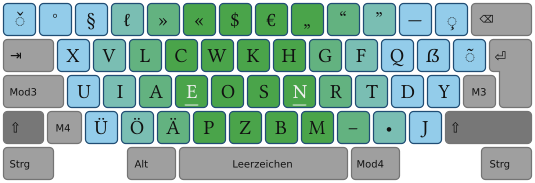
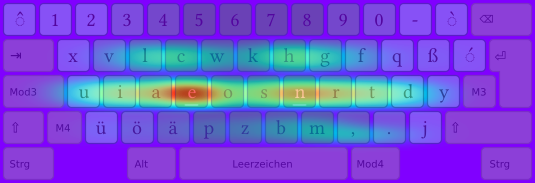
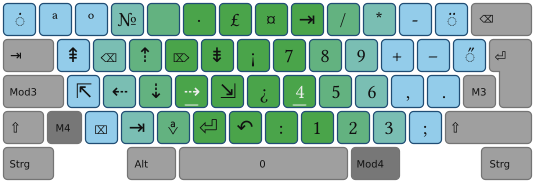
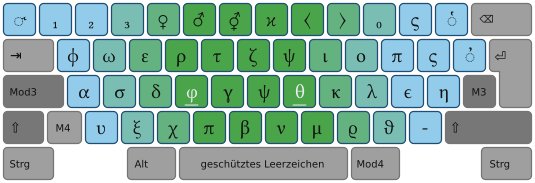
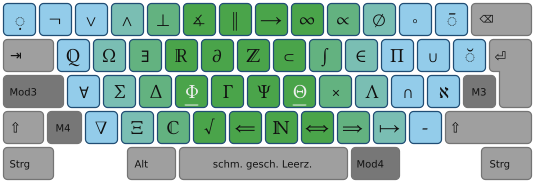
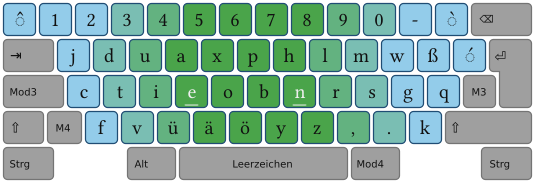
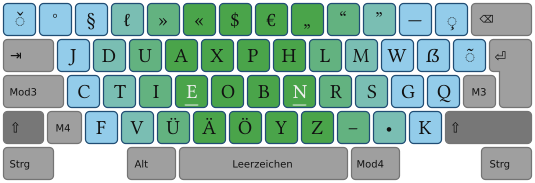
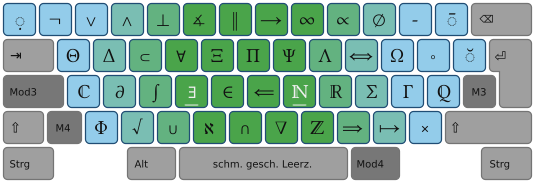
| 75 | | <div><img src="./tastatur_ebene1.png"/></div> |
| 76 | | |
| 77 | | <!-- |
| 78 | | <1div style="background-image:url(./hintergrund_button.png); width:650px; text-align:center;"> |
| 79 | | /--> |
| 80 | | <div id="linkbutton" style="min-width:650px; overflow:visible; text-align:center;"> |
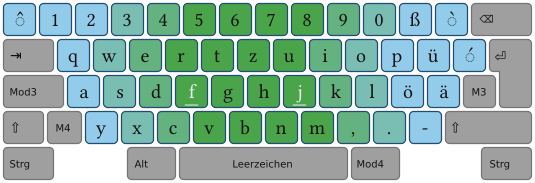
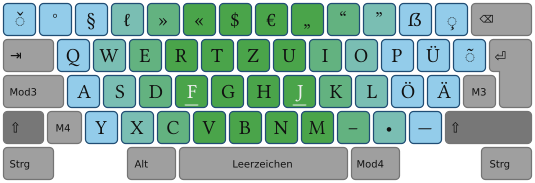
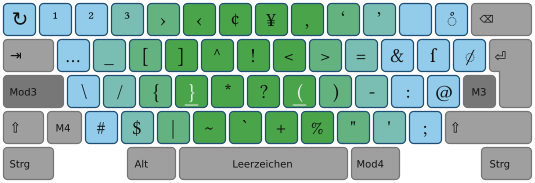
| 81 | | <a href="i" style="">Konzeptidee zur Ebene1</a> |
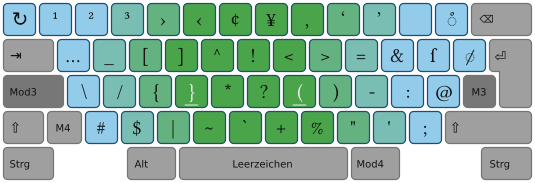
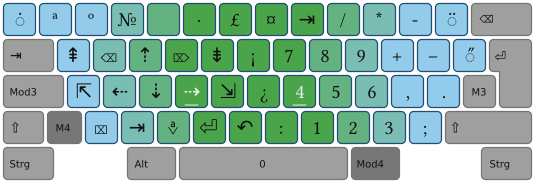
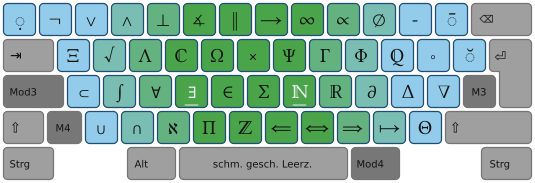
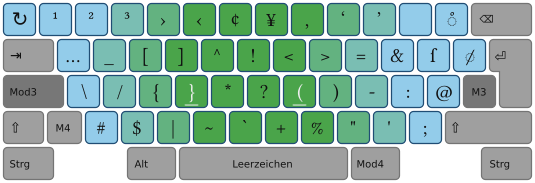
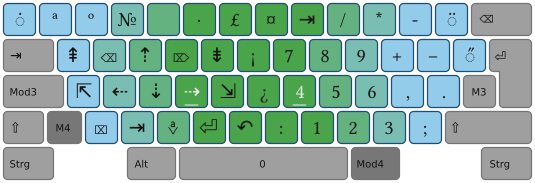
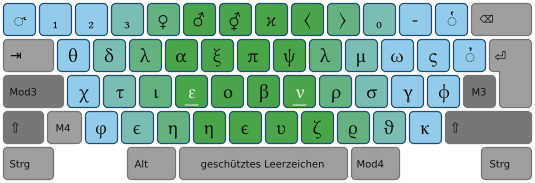
| 82 | | <a href="" > <img src="tastatur_ebene1_shift.png" style="vertical-align:middle; border-width:0px; margin:2px; background-image:url(./hintergrund_button_hover.png);" /></a> |
| 83 | | <a href="" > <img src="tastatur_ebene1_mod3.png" style="vertical-align:middle; border-width:0px; margin:2px; background-image:url(./hintergrund_button_hover.png);" /></a> |
| 84 | | <a href="" > <img src="tastatur_ebene1_mod4.png" style="vertical-align:middle; border-width:0px; margin:2px; background-image:url(./hintergrund_button_hover.png);" /></a> |
| 85 | | <br> |
| 86 | | |
| 87 | | <a href="i" style="">Tastenverteilung an beliebigem Text testen</a> |
| 88 | | </div> |
| 89 | | |
| 90 | | |
| 91 | | |
| 92 | | </div> |
| 93 | | </div> |
| 94 | | |
| 95 | | |
| 96 | | <hr style="clear:left"> |
| 97 | | |
| 98 | | |
| 99 | | |
| 100 | | <div style="position:absolute; top:22px; left:0px; width:100%; height:70px; background-image:url(./tastentier-reihe.png); background-repeat:repeat-x; 111opacity:.5; "></div> |
| 101 | | |
| 102 | | <div style="position:absolute; top:0px; right:0px; width:11px; height:100%; background-image:url(./schatten_rechts.png); background-repeat:repeat-y; background-attachment:scroll; "></div> |
| 103 | | <div style="position:absolute; top:0px; left:0px; width:100%; height:50px; background-image:url(./schatten_oben.png); background-repeat:repeat-x; "></div> |
| 104 | | <div style="position:absolute; top:0px; left:0px; width:50px; height:100%; background-image:url(./schatten_links.png); background-repeat:repeat-y; background-attachment:fixed; "></div> |
| 105 | | <div style="position:absolute; top:0px; left:0px; width:50px; height:50px; background-image:url(./schatten_links_oben.png); background-repeat:no-repeat; "></div> |
| 106 | | <div style="position:absolute; top:11px; right:0px; width:11px; height:11px; background-image:url(./schatten_rechts_oben-versetzt.png); background-repeat:no-repeat; "></div> |
| 107 | | |
| 108 | | |
| 109 | | |
| 110 | | |
| 111 | | |
| 112 | | <!-- |
| 113 | | <div style="position:absolute; bottom:10px; right:50px; z-index:15"><img src="tastentier.png"></div> |
| 114 | | /--> |
| 123 | | <img src="./tastentier_zufrieden2.png" style=";"> |
| | 45 | |
| | 46 | |
| | 47 | <!-- |
| | 48 | |
| | 49 | <div style="position:relative; top:-.6em; margin-bottom:1em;"> |
| | 50 | <h1 style="line-height:1em;">Willkommen zum neuen Schreibgefühl!</h1> |
| | 51 | <div style="position:relative; top:-.8em; margin-left:1em; color:#999; font-style:italic;">Ergonomischer, schneller und entspannter schreiben:</div> |
| | 52 | </div> |
| | 53 | |
| | 54 | /--> |
| | 55 | |
| | 56 | |
| | 57 | |
| | 58 | <!-- =================== Temporär: Baustelleninfo =============== /--> |
| | 59 | |
| | 60 | <div istyle="float:left;"> |
| | 61 | <img src="./tastentierchen_baustelle_ohne_zigarette.png" alt="Baustellenbild" /> |
| | 62 | </div> |
| | 63 | |
| | 64 | |
| | 65 | |
| | 66 | <div style="background-color:#fDD; border-color:#f00; margin:2em; padding:2em; border-style:solid; border-width:2px;; text-size:+2"> |
| | 67 | Momentan ist die Webpräsenz eine große Baustelle. Deswegen:<br> |
| | 68 | <a href="./baustelleninfos.html">Installationsinfos und Einsteigerübersicht hier!</a> |
| | 69 | </div> |
| | 70 | |
| | 71 | |
| | 72 | <!-- ========= ENDE ==== Temporär: Baustelleninfo =============== /--> |
| | 73 | |
| | 74 | |
| | 75 | |
| | 76 | |
| | 77 | <div style="text-align:left;"> |
| | 78 | |
| | 79 | <p> |
| | 80 | <font style="color:#222">Neo ist ein neue Tastaturbelegung, die </font>extra für die Deutsche Sprache<font style="color:#222"> optimiert ist. Ihre Hauptmerkmale sind:</font> |
| | 81 | </p> |
| | 82 | |
| | 83 | <ul> |
| | 84 | <li><font style="color:#222">Optimierungen bezüglich deutscher</font> Zweier- und Dreier-Zeichenfolgen</li> |
| | 85 | <li>Programmiertasten <font style="color:#222">sind gut erreichbar</font></li> |
| | 86 | <li><font style="color:#222">Neue Zeichen, wie </font> „ , ” , « , » , ∫ , √ , α , β , …<font style="color:#222"> sind direkt einzugeben</font></li> |
| | 87 | </ul> |
| | 88 | |
| | 89 | <div id="linkbutton"> |
| | 90 | <a href="i" >Warum neo besser ist als qwertz</a> |
| | 91 | </div> |
| | 92 | |
| | 93 | </div> |
| | 94 | |
| | 95 | |
| | 100 | <br> |
| | 101 | <br> |
| | 102 | <hr> |
| | 103 | |
| | 104 | |
| | 105 | |
| | 106 | <div style="display:block; background-image:url(./tastatur_blass_gerastert.png); background-position: top center;" > |
| | 107 | <div style="text-align:center; "> |
| | 108 | |
| | 109 | |
| | 110 | <div style="min-width:650px; overflow:visible;"> |
| | 111 | <div id="linkbutton" style="text-align:center; "> |
| | 112 | <a href="i" style=""><font style="color:#F42">Ebene1</font></a> |
| | 113 | <a href="i" style="">Ebene2</a> |
| | 114 | <a href="i" style="">Ebene3</a> |
| | 115 | <a href="i" style="">Ebene4</a> |
| | 116 | <a href="i" style="">Ebene5</a> |
| | 117 | </div> |
| | 118 | </div> |
| | 119 | |
| | 120 | <div> |
| | 121 | <img src="./tastatur_ebene1.png"/> |
| | 122 | </div> |
| | 123 | |
| | 124 | <div id="linkbutton" style="min-width:650px; overflow:visible; text-align:center;"> |
| | 125 | <a href="i" style="">Konzeptidee zur Ebene1</a> |
| | 126 | <a href="" > <img src="tastatur_ebene1_shift.png" style="vertical-align:middle; border-width:0px; margin:2px; background-image:url(./hintergrund_button_hover.png);" /></a> |
| | 127 | <a href="" > <img src="tastatur_ebene1_mod3.png" style="vertical-align:middle; border-width:0px; margin:2px; background-image:url(./hintergrund_button_hover.png);" /></a> |
| | 128 | <a href="" > <img src="tastatur_ebene1_mod4.png" style="vertical-align:middle; border-width:0px; margin:2px; background-image:url(./hintergrund_button_hover.png);" /></a> |
| | 129 | |
| | 130 | <br> |
| | 131 | |
| | 132 | <a href="i" style="">Tastenverteilung an beliebigem Text testen</a> |
| | 133 | </div> |
| | 134 | |
| | 135 | |
| | 136 | </div> |
| | 137 | </div> |
| | 138 | |
| | 139 | |
| | 147 | <hr style="clear:both"> |
| | 148 | |
| | 149 | <!-- =================== Hintergrundbilder (Seitenränder) =============== /--> |
| | 150 | |
| | 151 | <div style="position:absolute; top:22px; left:0px; width:100%; height:70px; |
| | 152 | background-image:url(./tastentier-reihe.png); background-repeat:repeat-x;"> |
| | 153 | </div> |
| | 154 | |
| | 155 | <div style="position:fixed; top:0px; right:0px; width:11px; height:100%; |
| | 156 | background-image:url(./schatten_rechts.png); background-repeat:repeat-y; background-attachment:scroll; "> |
| | 157 | </div> |
| | 158 | |
| | 159 | <div style="position:absolute; top:0px; left:0px; width:100%; height:50px; |
| | 160 | background-image:url(./schatten_oben.png); background-repeat:repeat-x; "> |
| | 161 | </div> |
| | 162 | |
| | 163 | <div style="position:fixed; top:0px; left:0px; width:50px; height:100%; |
| | 164 | background-image:url(./schatten_links.png); background-repeat:repeat-y; background-attachment:fixed; "> |
| | 165 | </div> |
| | 166 | |
| | 167 | <div style="position:absolute; top:0px; left:0px; width:50px; height:50px; |
| | 168 | background-image:url(./schatten_links_oben.png); background-repeat:no-repeat; "> |
| | 169 | </div> |
| | 170 | |
| | 171 | <div style="position:absolute; top:11px; right:0px; width:11px; height:11px; |
| | 172 | background-image:url(./schatten_rechts_oben-versetzt.png); background-repeat:no-repeat; "> |
| | 173 | </div> |
| | 174 | |
| | 175 | <!-- ============ ENDE == Hintergrundbilder (Seitenränder) =============== /--> |
| | 176 | |
| | 177 | |
| | 178 | |
| | 179 | <!-- |
| | 180 | |
| | 181 | <div style="text-align:center;"> |
| | 182 | <img src="./tastentier_zufrieden2.png" align="middle" style=";"> |
| | 183 | </div> |
| | 184 | |
| | 185 | /--> |